
User Rights are managed through Security Levels, which control what each user can view, create, alter, delete, or print in a company.
Types of Users in Tally Prime
1. Owner (Administrator)
- Access all reports and configurations
- Full access to all features
- Create/alter/delete users
- Define security levels
- Enable/disable security controls
2. Data Entry User
- Limited access (as defined by security level)
- Usually allowed to:
- Create vouchers (Sales, Purchase, Payment, etc.)
- View limited reports
- Cannot:
- Alter company features
- Access sensitive reports (unless permitted)
3. Auditor
- Read-only or restricted access
- Can:
- View vouchers and reports
- Use audit features (if enabled)
- Cannot:
- Create or alter data
Security Levels (User Rights)
Security levels define what a user can do.
Common permissions include:
Voucher Rights
- Create vouchers
- Alter vouchers
- Delete vouchers
- Cancel vouchers
Master Rights
- Create/alter ledgers
- Create/alter stock items
- Create/alter groups
Report Rights
- View financial statements
- Print reports
- Export data
Administrative Rights
- Company features (F11)
- Configuration (F12)
- Backup/Restore
- User management
How to Create User Rights
- Gateway of Tally
- Alt + K → Company → Users and Roles
- Select Security Levels
- Create a new security level
- Define permissions
- Go to Users
- Create user name & password
- Assign the security level
Report
Below is a customized Display Report for Tally Prime that shows all users along with their assigned Security Level (Role) and permissions.
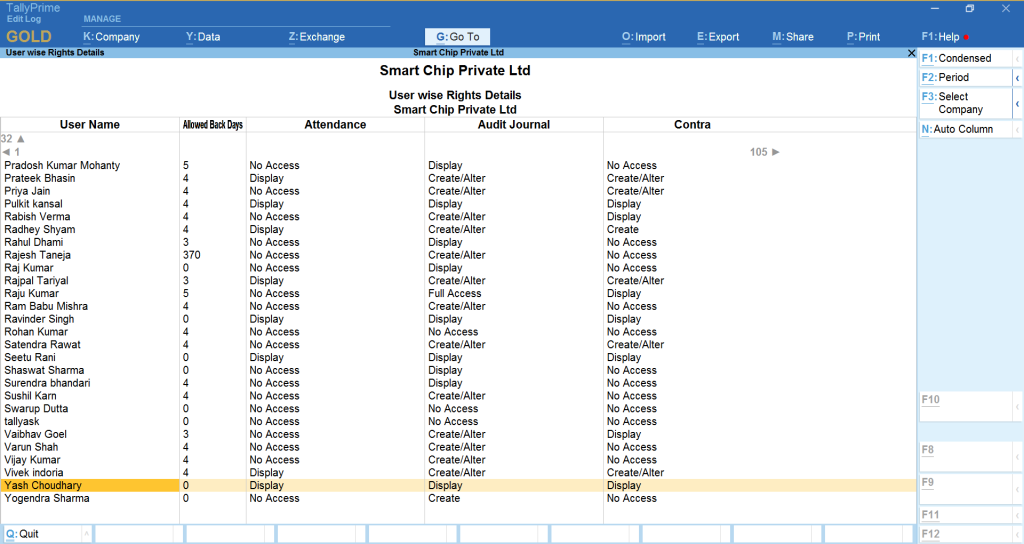
Key Benefits
- Complete user-wise rights visibility
- Useful for audit & internal control
- Helps admin verify role-based access
- Show company-wise users
- Export to Excel