
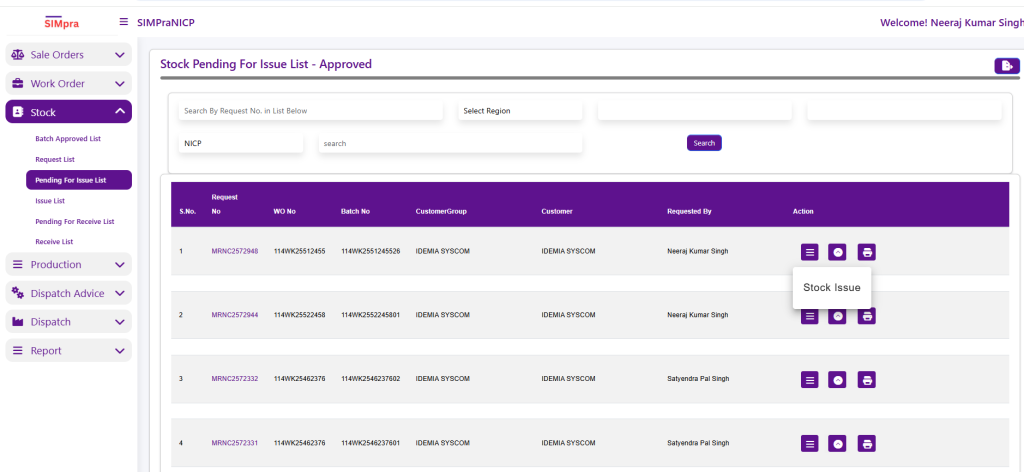
Stock Pending For Issue List
The Stock Pending for Issue List – Approved screen displays all approved stock requests that are pending material issue. Users can search by Request Number and filter data by Region.
This list shows Request No., Work Order No., Batch No., Customer Group, Customer, Requested By, along with Product Name, Product Code, and Quantity. By right-clicking on a record, users can select Create Stock Issue from the context menu to issue the required material against the approved stock request.
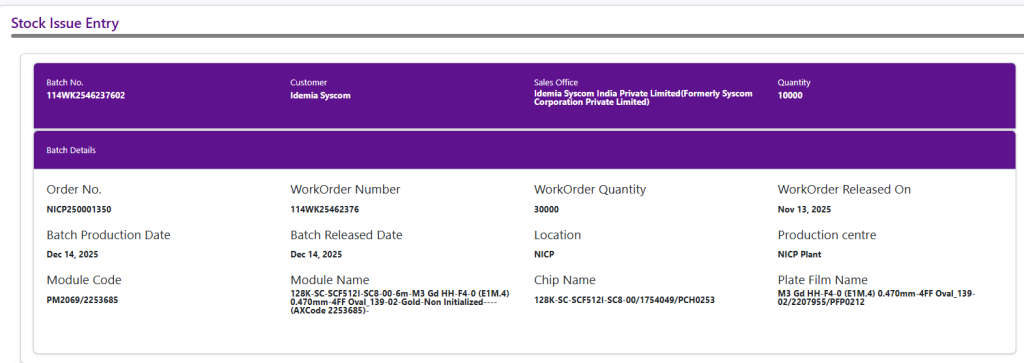
Stock Issue Entry
The Stock Issue Entry screen is used to issue approved materials against a specific batch and work order. It displays complete batch, customer, and sales office details, along with the required issue quantity.
The Batch Details section provides information such as Order Number, Work Order Number, Work Order Quantity, release dates, production date, location, production center, and module details. This ensures materials are issued against the correct work order and batch.
In the Request Details section, users select the material lot/reel (for example, chip reels), view received and balance quantities, and choose the required reel quantity for issue. Once the reel is selected and quantities are verified, the stock can be issued to support batch production.
The Remarks section is used to enter any additional notes or comments related to the stock issue transaction. The Operator field displays the name and ID of the user .
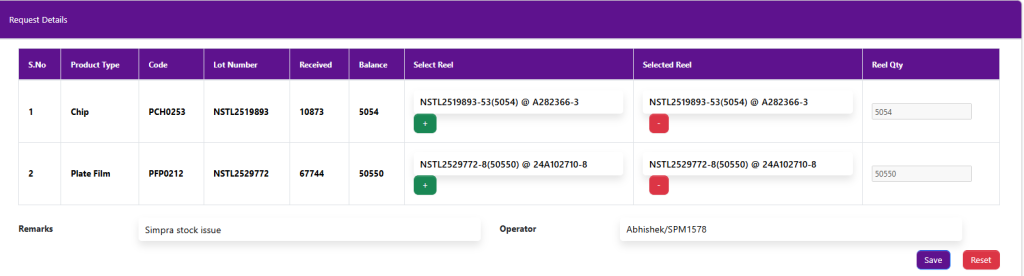
Click on Save for Stock Issue