
The Dashboard is the main landing page of the eSCLator. It provides employees with a centralized view of important information, quick actions, and recent updates. The dashboard is designed to be user-friendly, informative, and easily accessible, enabling employees to manage their daily work-related activities efficiently.
Purpose of the Dashboard
- Improve productivity by minimizing navigation time.
- Provide quick access to essential employee services
- Display real-time employee-related information
- Reduce dependency on the HR department for routine tasks
Benefits
- Saves time by providing all essential services in one place
- Enhances transparency between employees and HR
- Improves user experience through intuitive design
- Supports self-service functionality, reducing manual workload
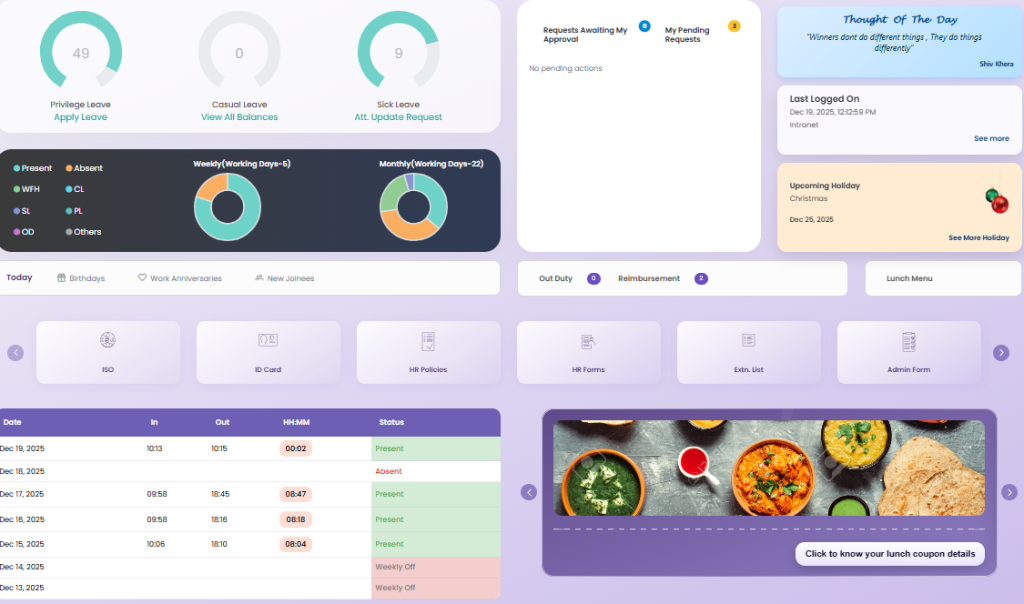
Dashboard Functionalities
1. Leave Information
- Displays a summary of leave data, including available, used, and pending leaves.
- Employees can apply for leave directly by clicking on the “Apply Leave” option from the dashboard.
- Provides quick visibility of leave status to ensure transparency and planning.
2. Attendance Overview
- Shows weekly attendance details, including present, absent, OD (On Duty), and WFH (Work From Home) status.
- Employees can navigate to the Update Attendance module directly from the dashboard for corrections or regularization.
3. Attendance and Leave Analytics
- Displays graphical charts for weekly and monthly data related to:
- Leave
- On Duty (OD)
- Work From Home (WFH)
- Visual representation helps employees understand attendance patterns and leave usage effectively.
4. Lunch Menu and Coupons
- Shows the daily lunch menu on the dashboard.
- Provides a quick link to view lunch coupon details, including availability and usage.
5. Requests Overview
- Displays awaited requests and pending requests, such as:
- Leave approvals
- Attendance regularization
- Other HR-related requests
- Helps employees track the status of their submitted requests in real time.
6. Thought of the Day
- Displays a “Thought of the Day” message to promote positivity, motivation, and employee engagement.
7. Upcoming Holidays
- Shows a list of upcoming holidays as per the company holiday calendar.
- Assists employees in planning leaves and work schedules in advance.
8. Quick Links
- Provides quick access links to frequently used modules such as:
- Apply Leave
- Update Attendance
- ISO
- ID Card
- HR Policies
- HR Forms
- Extension list
- Admin Forms
- Quality
- Travel Desk
- IT Asset
- Reduces navigation time and improves overall system usability.
9. Employee Highlights
- Shows today’s birthdays of employees.
- Displays work anniversaries, highlighting employee milestones.
- Lists new joinees, helping employees stay informed and connected within the organization.
10. Last Logged-In Activity
- Displays the date and time of the employee’s last login to the system.
- Helps users monitor account activity and enhances system security awareness.