Sub-Application List
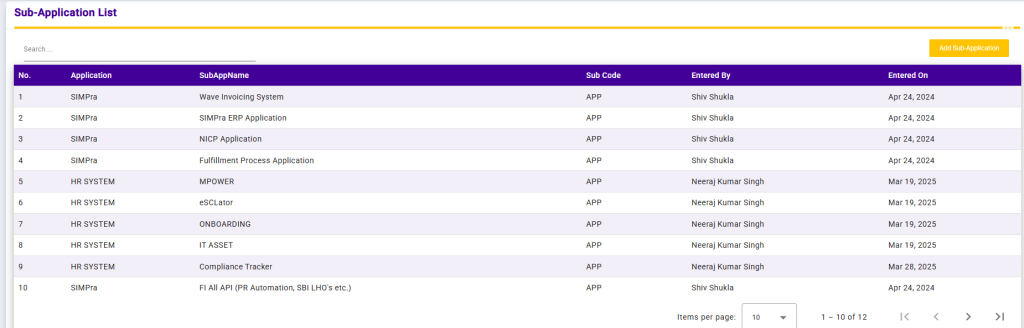
The Sub-Application List screen displays all sub-applications mapped to their parent applications within the system. It provides a structured view of application hierarchies and related audit information.
Each record includes the Application Name, Sub-Application Name, Sub Code, Entered By, and Entered On date. The Search option allows users to quickly filter sub-applications based on application or sub-application names.
This screen helps in managing complex applications by organizing them into sub-modules, ensuring better visibility, control, and governance across the system.
Add Sub-Application
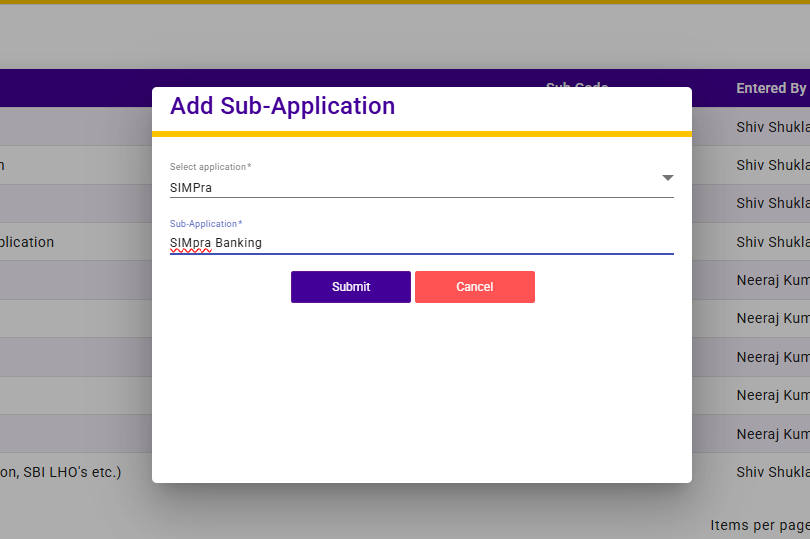
The Add Sub-Application screen allows users to create and map a sub-application under a selected parent application.
Users must select an Application from the dropdown list and then enter the Sub-Application Name to define the new module or process. Once the details are submitted, the sub-application is saved and linked to the selected application.
This functionality helps organize applications into logical sub-modules, improving system structure, management, and traceability.