Sponsor List
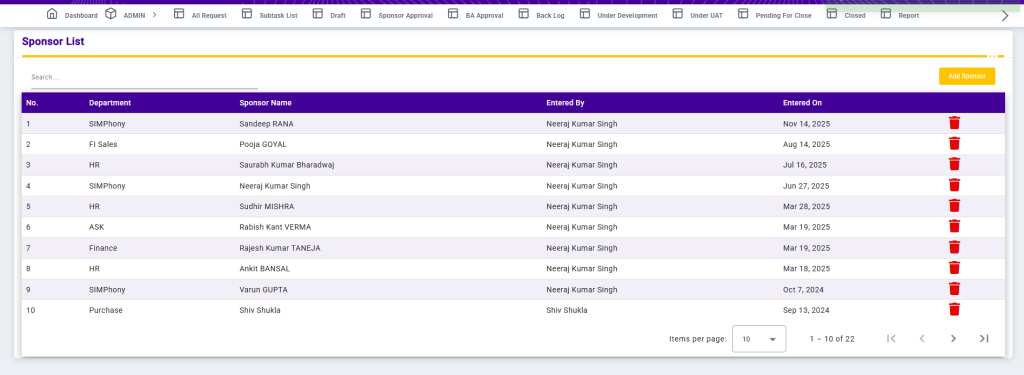
The Sponsor List screen displays all sponsors mapped to their respective departments within the system. It provides a centralized view of sponsor information along with audit details for tracking and management purposes.
Each record shows the Department, Sponsor Name, Entered By, and Entered On date. The Search option allows users to quickly filter and locate specific sponsors based on department or sponsor name.
This page helps ensure clear visibility of departmental sponsors and supports efficient sponsor management and accountability.
Add Sponsor
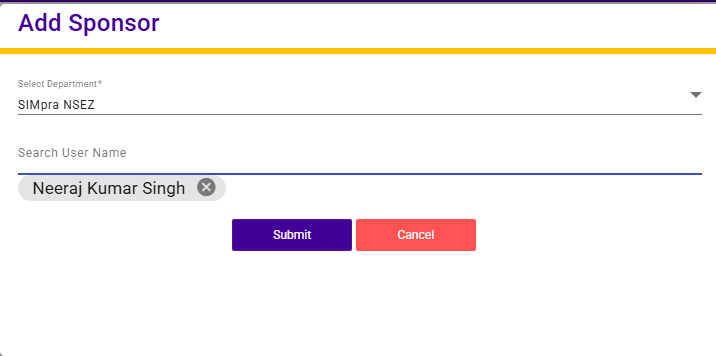
The Add Sponsor screen allows users to add a sponsor by mapping a user to a specific department.
Users must select a Department from the dropdown list. After selecting the department, they can search and select a user name to assign as a sponsor. Once the required details are selected, the sponsor can be saved and added to the sponsor list.
This functionality helps in maintaining clear sponsor ownership across departments and ensures proper accountability within the system.