
Objective
This document aims to describe the flow of ARTWORK request submission on SIMPhony Artwork Extension Application by Customer Service / Technical Consultant (TC) team. This document applies to Mobile Operators, BDA & CI Business Units at IDEMIA.
Artwork Extension system is an online interface which provides Customer Service/TC team and TEC team to maintain transparency in the Artwork creation process.
The manual’s instructions are combined with Artwork Extension system images to make the user familiar with system interfaces as well as the workflow. The screens are self- explanatory to guide the user while using the system.
This user guide provides solutions to create new Artwork requests, view the status of already requested Artwork(s).
Note: All data displayed within each screen shot of the manual is for display purpose only and does not reflect any real customer data. Screen shots are just for reference, they may get changed during development.
AUDIENCE
Customer Services / Technical Consultants (TC) TEC Team
HISTORY
Document Creation Date: 20/08/2025
| Action | Name/Position | Date |
|---|---|---|
| Created By | Avanish Tewari | 22 August 2025 |
| Approved By | Devendra Tayal | 22 August 2025 |
| Date | Insert Version | Update/Description | Approved By |
|---|---|---|---|
| 30-11-2020 | 0.1 | First Release of the Document | Vipul Garg |
| 22-08-2025 | 0.2 | With Updated Features of Artwork Extension | Devendra Tayal |
INTRODUCTION
The Artwork Extension System is an application which facilitates the CS/TC and TEC team to ease the process of artwork request till its delivery. The Artwork Main System is designed to be used by both CS/TC and TEC team. The functionalities of both the roles are interdependent on each other.
CS/ TC Team can perform the following operations:
- Creating Request
- Resubmit Review Non-Ok Request
- Validating DAD
- Validate Optional Input
- Raising Change Request
- Approving Redelivery Request
TEC Team can perform the following operations:
- Reviewing Request
- Creating DAD
- Delivering Artwork
- Approving Change Request
- Delivery Optional Input
- Raising Redeliver Request
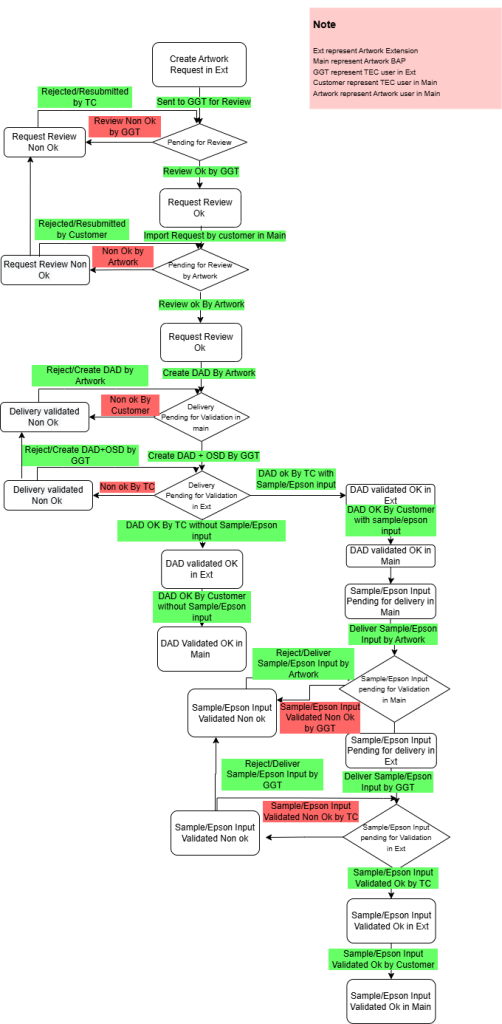
Flow Chart
Workflow of Artwork System
Navigations
 TC must login to SIMPhony using his/her credentials. For creation of Artwork Request, he must click on “Artwork Portal Extension” Module.

On Successful Login as TC, the below Dashboard screen appears when clicked on the Home Button.

System Interfaces which provide user to view, add and update data in the system. This part is highlighted in a figure TEC Dashboard with green color.
- Workflow
- Customer Actions
- Customer Views
- Request
- New Request
- Change Request
- List
- History
- Discarded Artworks
- Forum
- List
- Reports
- Artwork Overview
- Artwork Summary
- Hold/Un-Hold Logs
Note: Detailed description of these navigations has been provided in this document in next chapters
System Data: A quick view of the system of recent activity, also a view some historical data. This part is highlighted in a figure TEC Dashboard with red color.
- Customer Actions
- Customer Views
- Overview of All Artwork Requests
- Change Request Summary
- Forum Summary


