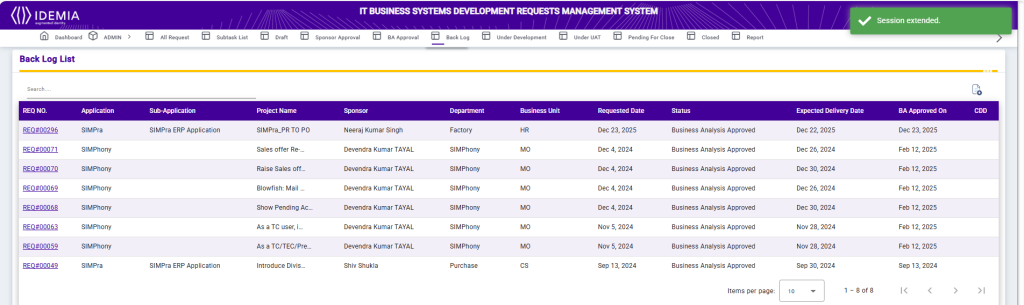
Back Log List
The Back Log List screen displays all requests that have been approved during the Business Analysis phase and are awaiting development or further processing. It provides a consolidated view of approved requests along with their planning and commitment details.
Each record includes the Request Number, Application, Sub-Application, Project Name, Sponsor, Department, Business Unit, Requested Date, Current Status, Expected Delivery Date, BA Approved On date, and CDD (Committed Delivery Date). The Search option allows users to quickly locate specific backlog items.
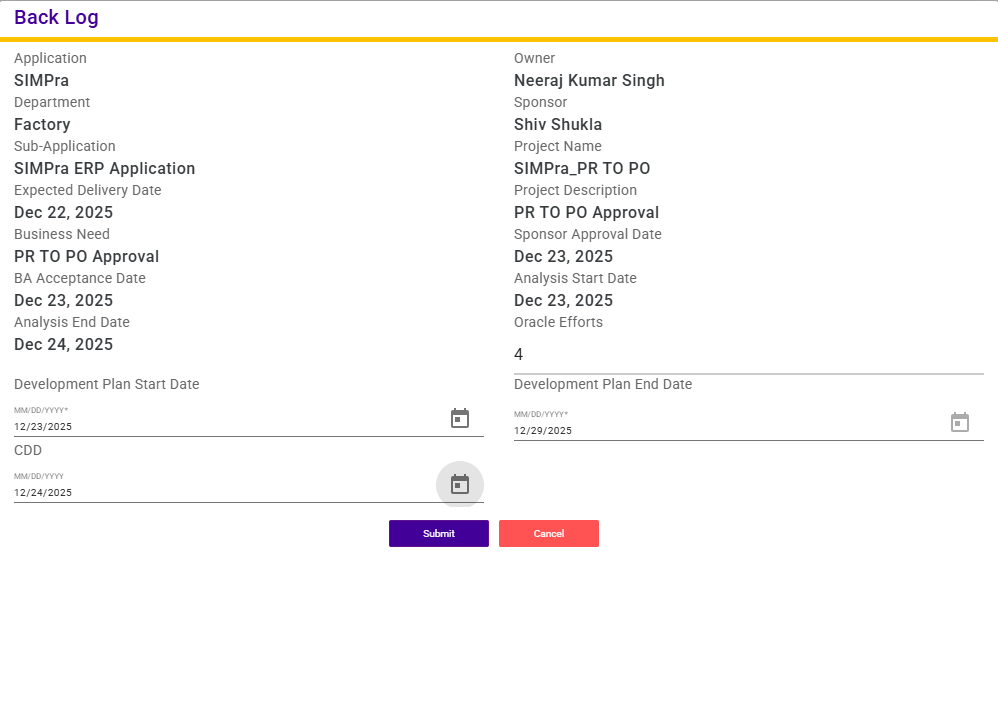
Back Log
The Back Log screen provides detailed information for a request that has been approved during the Business Analysis phase and is being planned for development.
This screen displays key project details including Application, Application Owner, Department, Sponsor, Sub-Application, Project Name, Expected Delivery Date, Project Description, and Business Need. It also shows important approval and analysis milestones such as Sponsor Approval Date, BA Acceptance Date, Analysis Start Date, and Analysis End Date.
Users are required to enter Oracle Efforts, Development Plan Start Date, Development Plan End Date, and the CDD (Committed Delivery Date) to define the development timeline and effort estimation. After completing the required details, clicking Submit saves the backlog information and moves the request to the next stage of the workflow.