Role Linking List
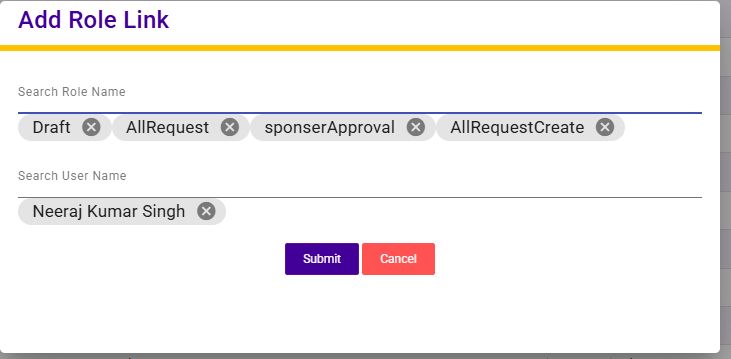
The Role Linking List screen displays the mapping between system roles and assigned users. It provides visibility into which users are linked to specific roles along with audit information.
Each entry shows the Role Name, Linked User Name, Entered By, and Entered On date. The Search option allows users to quickly filter role-user mappings based on role name or user name.
This screen helps administrators manage role assignments effectively, ensuring proper access control and responsibility allocation across the system.
Add Role Link
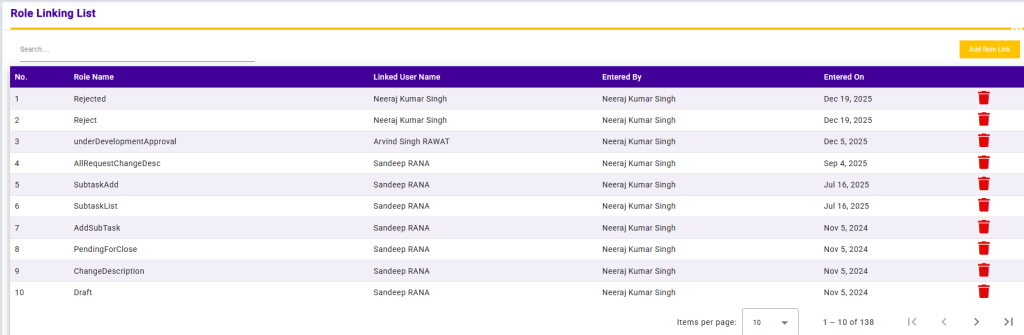
The Add Role Link screen allows administrators to assign a role to a user within the system.
Users can search and select a Role Name and then search and select a User Name to create the role-user mapping. After selecting the required details, clicking Submit will save the role link and assign the selected role to the user.
This functionality ensures proper role-based access control and helps maintain clear responsibility mapping across the application.