Overview
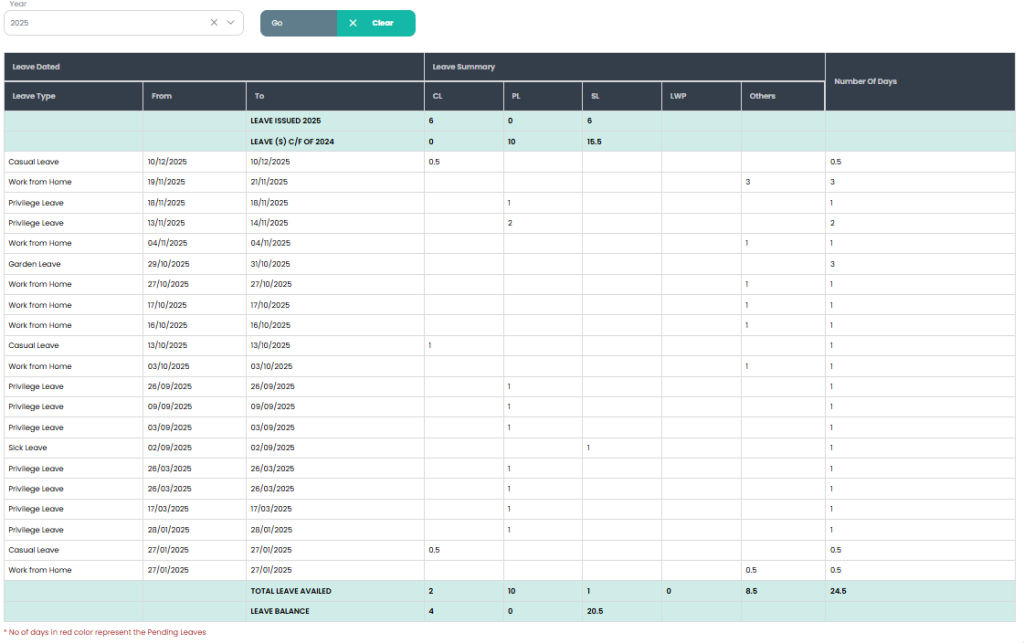
The Leave Details page displays a detailed and consolidated view of an employee’s leave information for a selected year. This page helps employees review their leave history, leave summary, total leaves availed, and remaining leave balance in a single screen.
Purpose
The Leave Details page is designed to:
- Provide a complete overview of employee leave records
- Display leave usage categorized by leave type
- Show leave balances and totals for better tracking
- Improve transparency and reduce HR dependency
1. Year Filter
- Allows employees to select a specific year (e.g., 2025).
- Includes:
- Go button to apply the selected year filter
- Clear button to reset the filter
2. Leave Details Table
a) Leave Dated Section
Displays individual leave records with the following columns:
- Leave Type (Casual Leave, Sick Leave, Privilege Leave, Work From Home, etc.)
- From Date
- To Date
Each row represents a single leave request applied by the employee.
b) Leave Summary Section
Provides a categorized summary of leaves based on type:
- CL – Casual Leave
- PL – Privilege Leave
- SL – Sick Leave
- LWP – Leave Without Pay
- Others – OD, WFH, Garden Leave, etc.
This section helps employees understand how many days were consumed under each leave category.
c) Number of Days
- Displays the total number of leave days for each leave entry.
- Supports full-day and half-day leave calculations (e.g., 0.5 days).
3. Leave Issued & Previous Balance
- Shows Leave Issued for the selected year.
- Displays Leave(s) carried forward from the previous year, if applicable.
4. Total Leave Availed
- Displays the total leaves used by the employee for the selected year, categorized by leave type.
- Helps in quickly identifying overall leave consumption.
5. Leave Balance
- Displays the remaining leave balance for each leave category after deduction.
- Ensures employees are aware of available leaves before applying for new requests.
6. Pending Leave Indicator
- A note is displayed indicating that leave days shown in red represent pending leave requests.
- Helps employees easily identify leaves that are still awaiting approval.
Workflow
- Employee selects a year (if required) and clicks Go
- System displays complete leave details, summary, totals, and balance
Benefits
- Provides complete visibility of leave history
- Easy tracking of used and remaining leaves
- Reduces confusion related to leave balances
- Improves transparency and employee self-service experience