
Employees can raise a request for ID card re-issuance and track the status of their submitted requests using date and status filters.
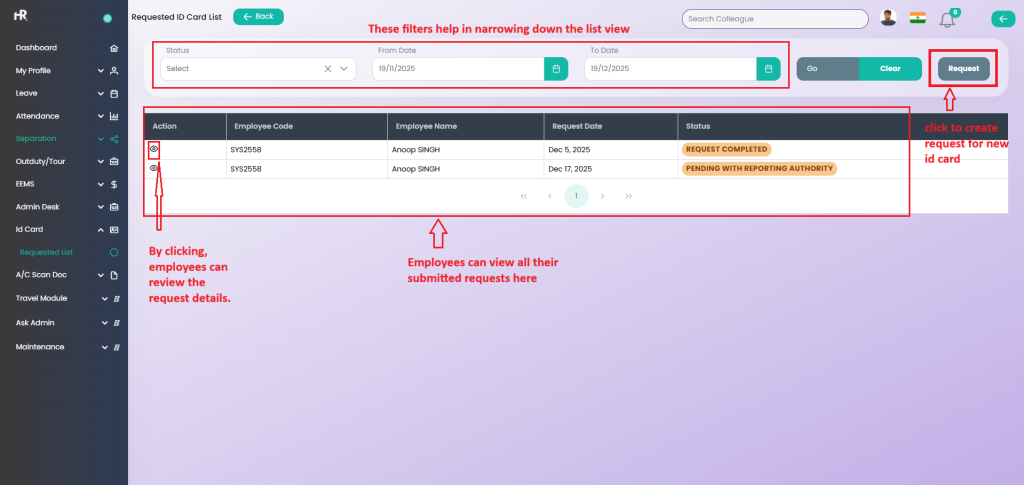
How to Raise a Request for a New ID
Once the Request button is clicked, the employee is required to complete the form below and submit it for approval.
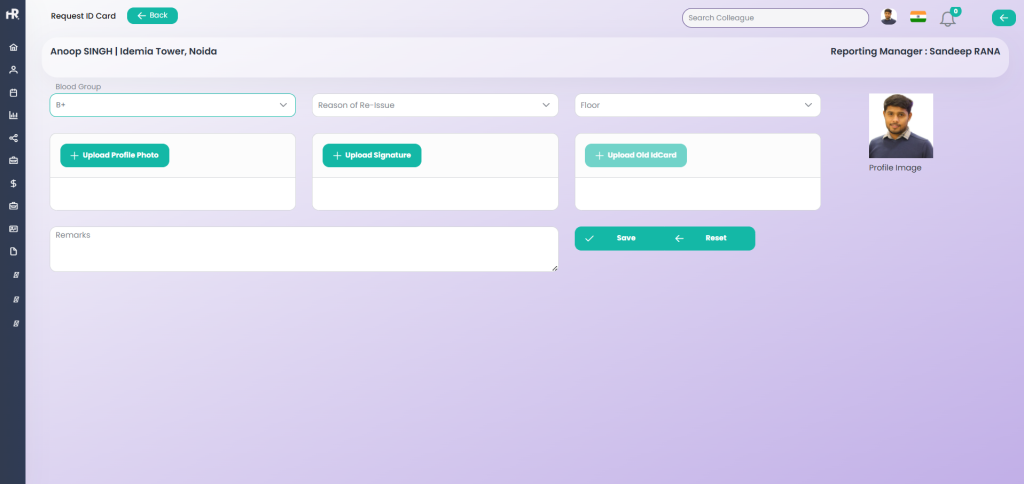
| Field Name | Mandatory | Description |
|---|---|---|
| Blood Group | Yes | Employee must select their blood group from the available options. |
| Reason for Issue | Yes | Employee must select the reason for ID card re-issue. Options include Lost ID Card, Damaged ID Card, Print Fade, and Others. |
| Select Floor | Yes | Employee is required to select the floor from the available options. |
| Upload Profile Photo | Conditional | Required only if the employee’s profile photo is not updated in the Esclator system. |
| Upload Signature | Yes | Employee must upload their signature. |
| Upload Old ID Card | Conditional | Required if the re-issue reason is not “Lost ID Card”. If the reason is Lost ID Card, uploading the old ID card is not required. |
| Remarks | Yes | Employee must provide remarks explaining the reason for ID card re-issuance. |
Once the request is successfully submitted, it will be sent to the manager and remain pending for action.