
Overview
The Edit Profile feature allows employees to update and maintain their personal, professional, and organizational information within the system. This feature ensures that employee records remain accurate, up to date, and aligned with HR and organizational requirements. Access to edit profile information is controlled based on user roles and permissions.
Edit Profile Navigation
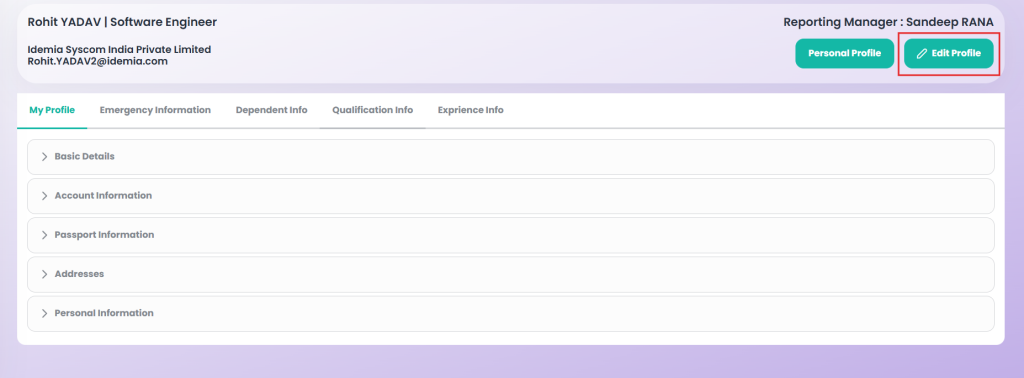
From the My Profile screen, the user can click the Edit Profile button available in the header section. Upon clicking this button, the system redirects the user to the Edit Profile page, where editable sections of the employee profile are displayed in an organised manner.
Feature Information
The Edit Profile feature allows employees to update their profile information in a structured manner. The left side displays the employee name and employee code, while the right side displays the reporting manager name for clear identification. The profile is organised into Six parts to enable easy and controlled editing of employee information.
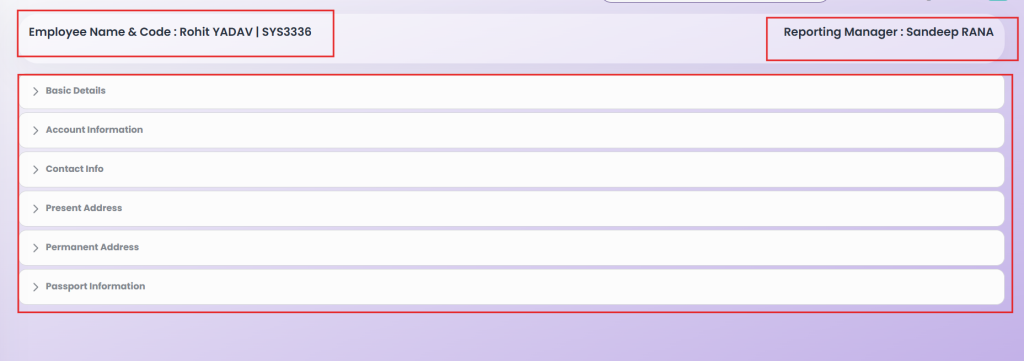
- Basic Details
- Account Information
- Contact Information
- Present Address
- Permanent Address
- Passport Information
Basic Details
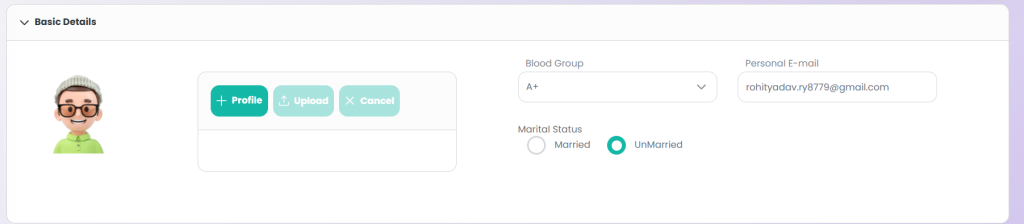
The Basic Details section allows employees to manage their core personal information. It includes the profile image, blood group, email ID, and gender, with appropriate input types and validation to ensure accurate and up-to-date information.
| Field Name | Field Type | Required / Optional | Description |
|---|---|---|---|
| Profile Image | File Upload | Optional | Allows the employee to upload or update their profile photo |
| Blood Group | Dropdown | Optional | Employee’s blood group; selection from predefined options (A+, A-, B+, B-, O+, O-, AB+, AB-) |
| Email ID | Input Field | Required | Employee’s personal email ID |
| Marital Status | Radio Button | Required | Employee’s Marital Status; selection from Married, UnMarried |
Account Information
The Account Information section allows employees to view and update their banking and statutory details. The Bank Account Number and IFSC Code fields are editable and required, while the other fields are read-only, displaying information provided during onboarding. This ensures critical data is accurate for payroll and compliance, while maintaining integrity of static information.

| Field Name | Field Type | Required / Optional | Editable / Read-only | Description |
|---|---|---|---|---|
| Bank Account Number | Input Field | Required | Editable | Employee’s bank account number for salary credit |
| IFSC Code | Input Field | Required | Editable | Bank branch IFSC code for salary transactions |
| Bank Name | Input Field | Optional | Read-only | Name of the bank provided at on-boarding |
| Branch | Input Field | Optional | Read-only | Bank branch name provided at on-boarding |
| PAN Number | Input Field | Optional | Read-only | Employee PAN number provided during on-boarding |
| PF Account Number | Input Field | Optional | Read-only | Provident Fund account number provided during on-boarding |
Contact Information
The Contact Information section allows employees to manage their communication details. All fields are editable, with Mobile 1 and Spoken Languages marked as mandatory, ensuring that critical contact information is always provided and up to date.

| Field Name | Field Type | Required / Optional | Editable / Read-only | Description |
|---|---|---|---|---|
| Mobile 1 | Input Field | Required | Editable | Primary contact number for official communication |
| Mobile 2 | Input Field | Optional | Editable | Secondary or alternate contact number |
| Spoken Languages | Input Field | Required | Editable | Languages spoken by the employee, used for communication purposes |
| Intercom | Input Field | Optional | Editable | Internal intercom number for office communication |
Present Address
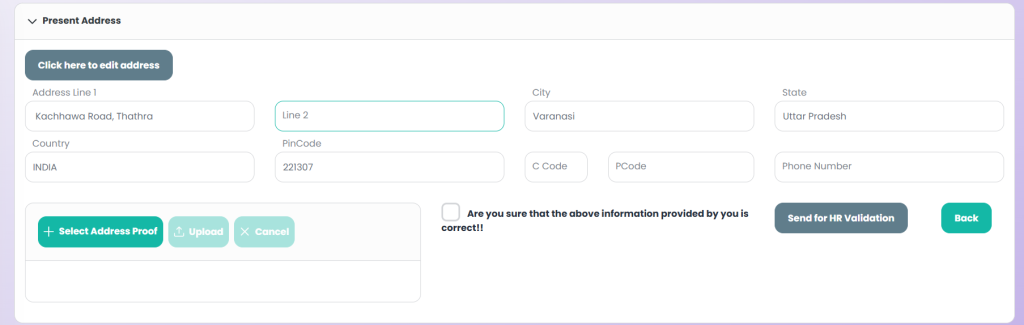
The Present Address section allows employees to view and update their current residential address. The form is designed to ensure accuracy, compliance, and proper verification before the information is approved by HR.
The Present Address form allows users to edit their address details by selecting the Edit Address option. Whenever an address change is made, uploading a valid address proof document becomes mandatory to support the update. Before submission, users must select a confirmation checkbox to acknowledge that all the information provided is accurate and complete. Once confirmed and submitted, the updated address details are automatically sent to HR for verification and validation. The address update process is completed only after successful approval by the HR team.
| Field Name | Field Type | Required / Optional | Editable / Read-only | Description |
|---|---|---|---|---|
| Address Line 1 | Input Field | Required | Editable | Primary address details such as house number, street name, and locality |
| Address Line 2 | Input Field | Optional | Editable | Additional address information such as landmark, apartment name, or floor number. |
| City | Input Field | Required | Editable | Name of the city corresponding to the present address. |
| State | Input Field | Required | Editable | Name of the state where the address is located. |
| Country | Input Field | Required | Editable | Country of the present address. |
| Pincode | Input Field | Required | Editable | Postal code of the address location. |
| C Code | Input Field | Optional | Editable | Telephone country code (e.g., +91 for India). |
| P Code | Input Field | Optional | Editable | Area or STD code for the landline number, if applicable. |
| Phone Number | Input Field | Optional | Editable | Contact phone number associated with the present address. |
| Address Proof | File Upload | Required | Editable | Upload a valid address proof document (e.g., Aadhaar card, utility bill, rent agreement). |
| Confirmation Checkbox | Checkbox | Required | Editable | User confirmation that the provided information is correct before submission. |
Permanent Address
The Permanent Address section captures the employee’s permanent residential address for official and statutory records. Users can either copy the present address details using the Same As Above option or manually enter the permanent address information. This section ensures accurate long-term address records within the system.

| Field Name | Field Type | Required / Optional | Editable / Read-only | Description |
|---|---|---|---|---|
| Same As Above | Checkbox | Optional | Editable | When selected, automatically copies the present address details into the permanent address fields. |
| Address Line 1 | Input Field | Required | Editable | Primary permanent address details such as house number, street name, and locality. |
| Address Line 2 | Input Field | Optional | Editable | Additional address information such as landmark, apartment, or floor details. |
| City | Input Field | Mandatory | Editable | City corresponding to the permanent address. |
| State | Input Field | Mandatory | Editable | State where the permanent address is located. |
| Country | Input Field | Mandatory | Editable | Country of the permanent address. |
| Pin Code | Input Field | Mandatory | Editable | Postal code of the permanent address location. |
| Country Code | Input Field | Optional | Editable | Telephone country code associated with the permanent address. |
| P Code | Input Field | Optional | Editable | Area or STD code for the landline number, if applicable. |
| Phone Number | Input Field | Optional | Editable | Contact phone number for the permanent address. |
Passport Information
The Passport Information section allows employees to provide their passport details for official, travel, or compliance-related purposes. This section is optional by default and can be updated by the employee whenever required.

| Field Name | Field Type | Required / Optional | Editable / Read-only | Description |
|---|---|---|---|---|
| Passport Number | Input Field | Optional | Editable | Unique passport identification number issued by the authority. |
| Issued From | Input Field | Optional | Editable | Place or authority from which the passport was issued. |
| Date of Issued | Date Picker | Optional | Editable | Date on which the passport was issued. |
| Date of Expire | Date Picker | Optional | Editable | Date on which the passport will expire. |