
Sale-Order List-Pending DA
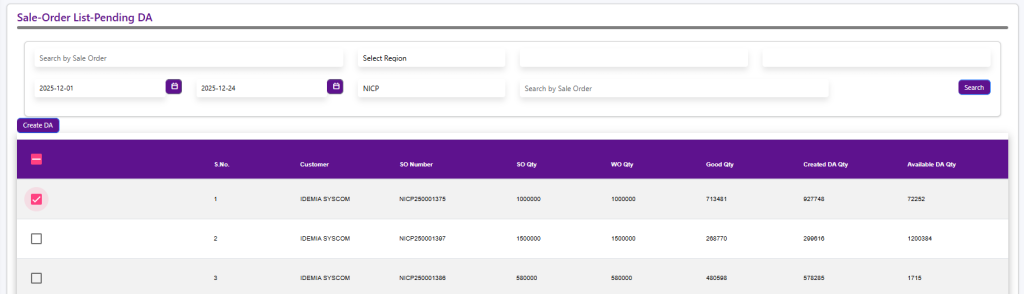
The Sale Order List – Pending DA screen is used to create Dispatch for sale orders. It displays sale orders where dispatch quantity is available.
Users can search by Sale Order Number and filter by Region and Date Range. The list shows Sale Order Quantity, Work Order Quantity, Good Quantity, Created DA Quantity, and Available DA Quantity, helping users select the correct sale order to initiate the dispatch (DA creation) process.
Dispatch Advice Entry
The Dispatch Advice Entry screen is used to create and record dispatch details against an approved Sale Order and Work Order. Users select the required SO/WO line item, which displays work order quantity, reel details, and available good quantity for dispatch.
In the Dispatch Details section, users enter Dispatch Date, Expected Delivery Date, Dispatch From location, Delivery Mode, Shipping Location, Billing Location, Buyer, and Notify Party to define the logistics information.
The Terms & Conditions section captures document type (Invoice), payment terms, Incoterms, and applicable tax details, ensuring commercial and compliance requirements are met.
Once all mandatory details are filled, the dispatch advice can be saved, initiating the dispatch process for the selected sale order.