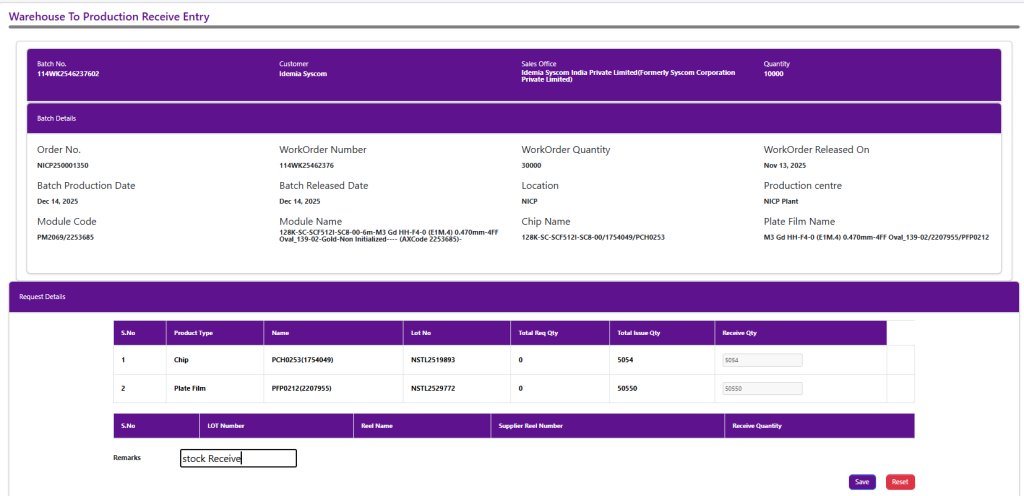
Stock Pending for Receive List
All entries in this list represent stock issues that have already been issued and are pending receipt at the destination. Users simply track these pending items and use the Create Receive option to record the actual receipt of materials
The list shows key details such as Issue No., Work Order No., Batch No., Customer, Issued By, along with Product Name, Issue Quantity, and Request Quantity. By right-clicking on a record, users can select Create Receive from the context menu to initiate the stock receiving process for the selected issue.
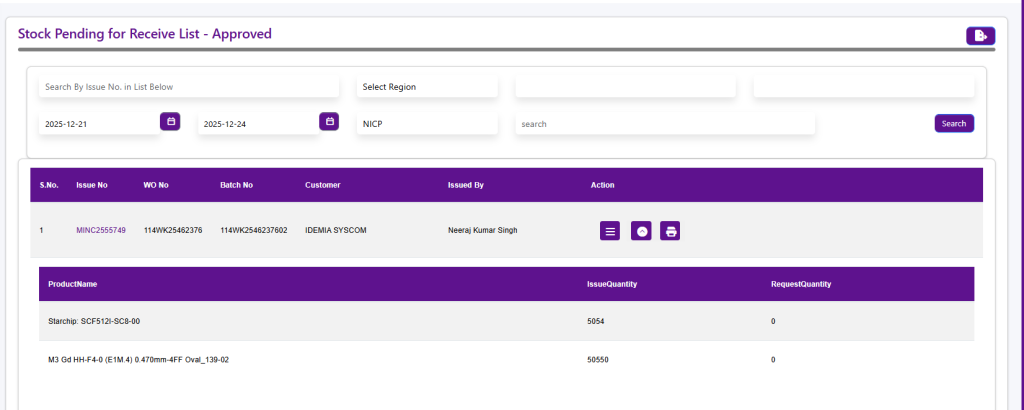
Warehouse To Production Receive Entry
The Warehouse to Production Receive Entry screen is used to record the receipt of materials issued from the warehouse to the production floor. It ensures that the issued stock is accurately received and updated against the corresponding batch and work order.
Key Sections:
- Batch & Customer Details: Displays Batch No., Customer, Sales Office, Quantity, Production Centre, Module and Chip details, and Batch Dates to identify the batch for which stock is being received.
- Request Details: Lists the product type, name, lot number, total requested quantity, total issued quantity, and the quantity received. Users confirm the received quantity matches the issued quantity.
- Lot & Reel Details: Tracks the LOT number, reel name, supplier reel number, and received quantity for traceability.
- Remarks: Users can enter notes related to the stock receipt