
New Request
On clicking the New Request button, a form gets opened with the following fields which needs to be filled.
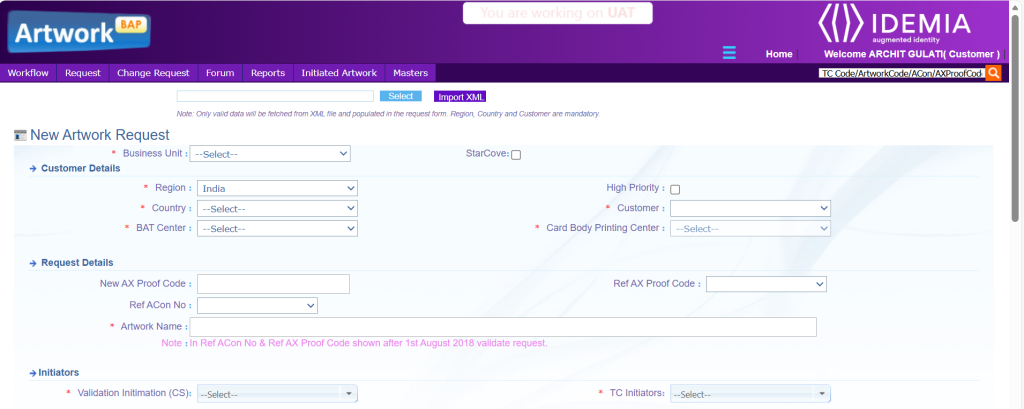

- High Priority > This checkbox is optional. If checked, then for one customer only 5 request can be created on the same day
- Business Unit > This field is mandatory and must be selected with the available options in the dropdown.
- Customer > Select customer from this dropdown.
- Region > Region will be auto populated in this dropdown to which above customer is linked.
- Country > Country will be auto populated in this dropdown to which above customer is linked.
- Save & Send > Post filing all info on request type page, click on Save & Send> Info will be saved, Request will be provided to Artwork Team to work on the same.
| Field | Description |
|---|---|
| Customer Details | |
| Select | From the Select button, Select the XML file. |
| Import XML | From the Import XML button fetched data from XML file selected and populated in the request form. |
| Business Unit | From the dropdown list, select name of the business unit. |
| High Priority | Select the High Priority checkbox for priority of request. |
| Region | From the dropdown list, select name of the region. |
| Country | From the dropdown list, select name of the country. The list is displayed on the basis of the selected region. |
| Customer | From the dropdown list, select the name of the customer. The list is displayed on the basis of region and country selected. |
| BAT Center | From the dropdown list, select name of the BAT Center. |
| Card Body Printing Center | From the dropdown list, Card Body Printing Center selected according to BAT Center. |
| Request Details | |
| New AX Proof Code | Type in the New AX Proof Code for artwork request. |
| Ref AX Proof Code | From the dropdown list, Ref AX Proof Code is available after artwork request is validated Ok. |
| Ref ACON No | From the dropdown list, Ref ACON No is available after artwork request is reviewed Ok. |
| Artwork Name | Type in the name of the artwork you want to imprint on the card. Note: Only alphanumeric characters are allowed as artwork name. |
| Initiators | |
| Validation Intimation | From the dropdown list, name is selected here. |
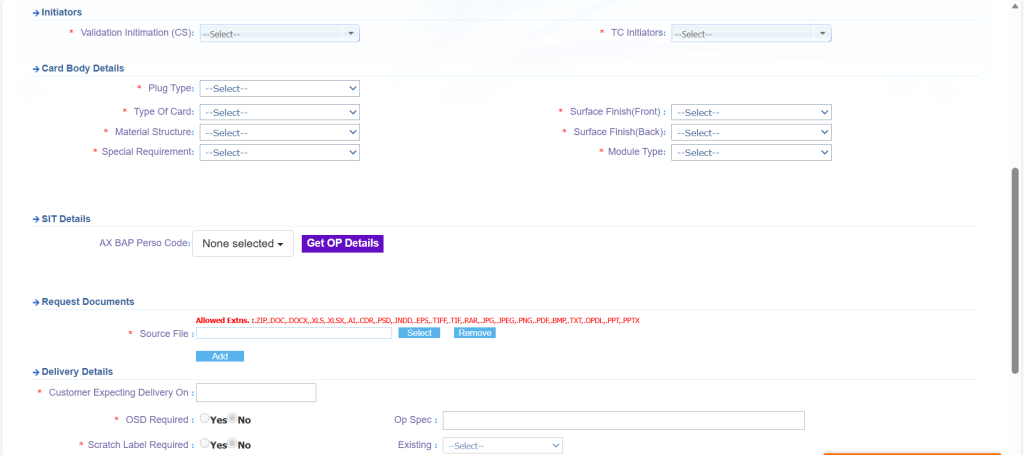
| Card Body Details | |
| Plug Type | From the dropdown list, select one of the following plugs required for the card: · 2FF · 3FF · SIMfit · Re-plug · 4FF |
| Surface Finish(Front) | From the dropdown list, select one of the following options: · Gloss · Matt · High Gloss/Mirror · Non Varnish |
| Type of Card | From the dropdown list, select one of the following options: – ID – Half – Quarter – 4 in one |
| Surface Finish (Back) | From the dropdown list, select one of the following options: · Gloss · Matt · High Gloss/Mirror · Non Varnish |
| Material Structure | From the dropdown list, select one of the following options: · ABS · ABS + PVC · PVC’s · ABS+PVC-7M |
| Special Requirement | From the dropdown list, select one of the special Requirement. |
| Module Type | From the dropdown list, select one of the following options: · 6 Contact · 8 Contact · NA |
| Request Documents | |
| Source File | To upload the source file with all the required details of the request to be created. |
| Delivery Details | |
| Source Files | Type in the name of source files which need to be used for creating artwork |
| SAD Required | Select the radio button Yes or No to indicate whether SAD is required. |
| Op Spec | Type in the name of Op Spec. Note: This field is mandatory in case “SAD Required” is selected as Yes. |
| Scratch Label Required | Select the radio button Yes or No to indicate whether Scratch Label is required. |
| Existing | From the dropdown list, select whether existing Scratch Label is required. If new scratch label is required, then type the name in the adjacent field. Note: This field is mandatory in case “Scratch Label Required” is selected as Yes. |
| Other Details | |
| Color Reference | From the dropdown list, select one of the following options. · EPSON PROOF · CUSTOMER REF SAMPLE · EXISTING REF SAMPLE · PANTONE · OTHERS |
| EXISTING REF SAMPLE | From the dropdown list, select the Existing Ref Sample of reference. |
| PANTONE | From the dropdown list, select the Pantone of reference. |
| Remarks | Type in remarks. |