
The Invoice Creation page is used to generate invoices for SBI (State Bank of India) based on production and personalization records for the selected period and location.
This page allows authorized users to filter eligible SBI records, review invoice-relevant details, and select entries for accurate and compliant invoice generation.
Purpose of the Page
- To generate SBI invoices for card production and personalization activities.
- To consolidate multiple SBI production requests into invoice-ready records.
- To ensure correct application of tax, scheme, and location details before invoice generation.
Filter Section
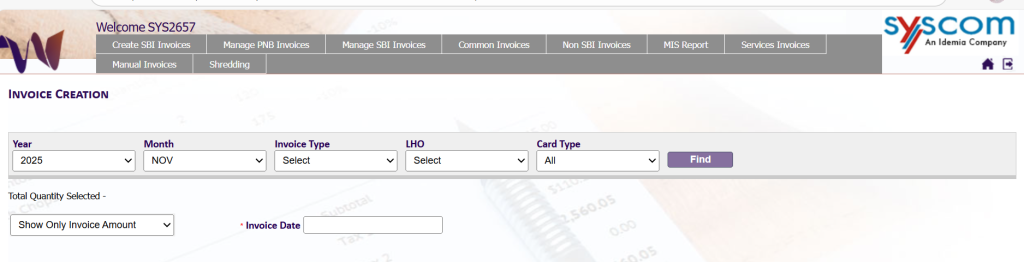
The top section of the page allows users to narrow down records using the following parameters:
- Year
Select the financial or calendar year for which invoices are to be generated. - Month
Select the corresponding month for invoice processing. - Invoice Type
Defines the category of invoice to be generated (e.g., Card). - LHO (Local Head Office)
Select the LHO associated with the records (e.g., BENGALURU – KA). - Card Type
Filter records based on card type or select All to view all card categories. - Find Button
Fetches and displays records matching the selected filter criteria.
User Actions
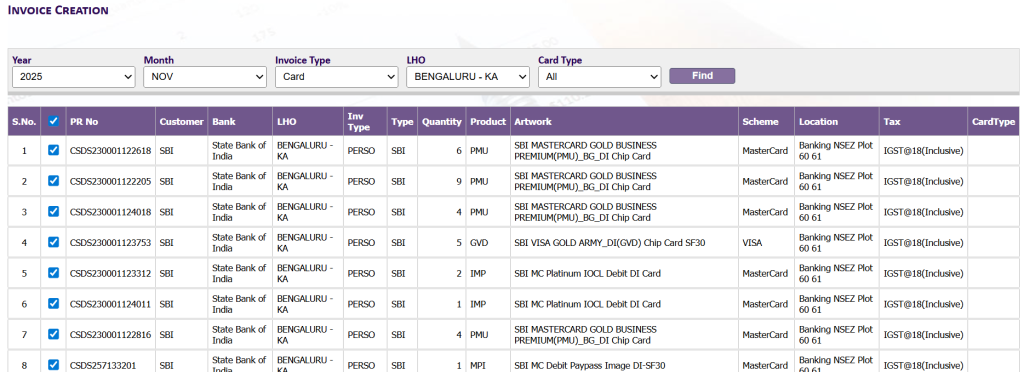
- Users can select multiple SBI records using the checkbox.
- Selected records are processed together to generate an SBI invoice.
- Only eligible SBI records are displayed for selection.
Key Notes
- This page is exclusively used for SBI invoice generation.
- Invoices are generated based on the selected Year, Month, Invoice Type, and LHO.
- Tax and scheme details shown are applied during SBI invoice calculation.
- Users must ensure selected records belong to the same invoice grouping to avoid validation issues.